

| _(You may browse this at https://github.com/ocornut/imgui/blob/master/docs/FONTS.md or view this file with any Markdown viewer)_ | |
| ## Dear ImGui: Using Fonts | |
| The code in Dear ImGui embeds a copy of [ProggyClean.ttf](https://github.com/bluescan/proggyfonts) by Tristan Grimmer, | |
| a 13 pixels high, pixel-perfect font used by default. ProggyClean does not scale very nicely. | |
| The code in Dear ImGui embeds a partial copy of [ProggyForever.ttf](https://github.com/ocornut/proggyforever) by Disco Hello & Tristan Grimmer, | |
| a new font mimicking ProggyClean which does scale nicely. | |
| We embed fonts in the code so you can use Dear ImGui without any file system access. | |
| If you don't use them you can set `IMGUI_DISABLE_DEFAULT_FONT` in your [imconfig.h](https://github.com/ocornut/imgui/blob/master/imconfig.h) file to ship binaries without the fonts and save about ~26 KB. | |
| Calling io.Fonts->AddFontDefaultVector() loads ProggyForever. | |
| Calling io.Fonts->AddFontDefaultBitmap() loads ProggyClean. | |
| Calling io.Fonts->AddFontDefault() selects one based on the expected default font size (when `style.FontSizeBase * style.FontScaleMain * style.FontSizeDpi >= 15` we use ProggyForever). | |
| You may also load external .TTF/.OTF files, see instructions on this page. | |
| In the [misc/fonts/](https://github.com/ocornut/imgui/tree/master/misc/fonts) folder you can find a few suggested fonts, provided as a convenience. | |
| **Also read the FAQ:** https://www.dearimgui.com/faq (there is a Fonts section!) | |
| ## Index | |
| - [Troubleshooting](#troubleshooting) | |
| - [New! Dynamic Fonts system in 1.92 (June 2025)](#new-dynamic-fonts-system-in-192-june-2025) | |
| - [How should I handle DPI in my application?](#how-should-i-handle-dpi-in-my-application) | |
| - [Fonts Loading Instructions](#fonts-loading-instructions) | |
| - [Loading Font Data from Memory](#loading-font-data-from-memory) | |
| - [Loading Font Data Embedded In Source Code](#loading-font-data-embedded-in-source-code) | |
| - [Using Icon Fonts](#using-icon-fonts) | |
| - [Excluding Overlapping Ranges](#excluding-overlapping-ranges) | |
| - [Using FreeType Rasterizer (imgui_freetype)](#using-freetype-rasterizer-imgui_freetype) | |
| - [Using Colorful Glyphs/Emojis](#using-colorful-glyphsemojis) | |
| - [Using Custom Glyph Ranges](#using-custom-glyph-ranges) | |
| - [Using Custom Colorful Icons](#using-custom-colorful-icons) | |
| - [About Filenames](#about-filenames) | |
| - [About UTF-8 Encoding](#about-utf-8-encoding) | |
| - [Debug Tools](#debug-tools) | |
| - [Credits/Licenses For Fonts Included In Repository](#creditslicenses-for-fonts-included-in-repository) | |
| - [Font Links](#font-links) | |
| --------------------------------------- | |
| ## Troubleshooting | |
| **A vast majority of font and text related issues encountered comes from 4 things:** | |
| ### (1) Invalid filename due to use of `\` or unexpected working directory. | |
| See [About Filenames](#about-filenames). AddFontXXX() functions should assert if the filename is incorrect. | |
| ### (2) Invalid UTF-8 encoding of your non-ASCII strings. | |
| See [About UTF-8 Encoding](#about-utf-8-encoding). Use the encoding viewer to confirm encoding of string literal in your source code is correct. | |
| ### (3) Missing glyph ranges. | |
| 🆕 **Since 1.92, with an up to date backend: specifying glyph ranges is unnecessary.** | |
| ⏪ Before 1.92: you need to load a font with explicit glyph ranges if you want to use non-ASCII characters. See [Fonts Loading Instructions](#fonts-loading-instructions). Use [Debug Tools](#debug-tools) confirm loaded fonts and loaded glyph ranges. | |
| This was a previous constraint of Dear ImGui (lifted in 1.92): when loading a font you need to specify which characters glyphs to load. | |
| All loaded fonts glyphs are rendered into a single texture atlas ahead of time. Calling either of `io.Fonts->GetTexDataAsAlpha8()`, `io.Fonts->GetTexDataAsRGBA32()` or `io.Fonts->Build()` will build the atlas. This is generally called by the Renderer backend, e.g. `ImGui_ImplDX11_NewFrame()` calls it. **If you use custom glyphs ranges, make sure the array is persistent** and available during the calls to `GetTexDataAsAlpha8()/GetTexDataAsRGBA32()/Build()`. | |
| ### (4) Font atlas texture fails to upload to GPU. | |
| 🆕 **Since 1.92, with an up to date backend: atlas is built incrementally and dynamically resized, this is less likely to happen** | |
| :rewind: This is often of byproduct of point 3. If you have large number of glyphs or multiple fonts, the texture may become too big for your graphics API. **The typical result of failing to upload a texture is if every glyph or everything appears as empty white rectangles.** Mind the fact that some graphics drivers have texture size limitation. If you are building a PC application, mind the fact that your users may use hardware with lower limitations than yours. | |
|  | |
| Some solutions: | |
| - You may reduce oversampling, e.g. `font_config.OversampleH = 1`, this will half your texture size for a quality loss. | |
| Note that while OversampleH = 2 looks visibly very close to 3 in most situations, with OversampleH = 1 the quality drop will be noticeable. Read about oversampling [here](https://github.com/nothings/stb/blob/master/tests/oversample). | |
| - Reduce glyphs ranges by calculating them from source localization data. | |
| You can use the `ImFontGlyphRangesBuilder` for this purpose and rebuilding your atlas between frames when new characters are needed. This will be the biggest win! | |
| - Set `io.Fonts.Flags |= ImFontAtlasFlags_NoPowerOfTwoHeight;` to disable rounding the texture height to the next power of two. | |
| ### (5) Reduce texture resizes/copy on startup | |
| 🆕 Since 1.92, the ImFontAtlas is initially created using a 512x128 texture, then grows as glyphs and fonts are used. Atlas growth leads to alloc+copy, and both the old and new sized textures are present in memory for a short time (typically one frame). If you use known fonts and want to reduce initial growth, you may set `TexMinWidth` and `TexMinHeight` during initializaton. | |
| ```cpp | |
| ImFontAtlas* atlas = io.Fonts; | |
| atlas->TexMinWidth = 1024; | |
| atlas->TexMinHeight = 1024; | |
| atlas->AddFont(...); | |
| ``` | |
| ##### [Return to Index](#index) | |
| --------------------------------------- | |
| ## New! Dynamic Fonts system in 1.92 (June 2025) | |
| v1.92 introduces a newer, dynamic font system. It requires backend to support the `ImGuiBackendFlags_HasTextures` feature: | |
| - Users of icons, Asian and non-English languages do not need to pre-build all glyphs ahead of time. Saving on loading time, memory, and also reducing issues with missing glyphs. Specifying glyph ranges is not needed anymore. | |
| - `PushFont(nullptr, new_size)` may be used anytime to change font size. | |
| - Packing custom rectangles is more convenient as pixels may be written to immediately. | |
| - Any update to fonts previously required backend specific calls to re-upload the texture, and said calls were not portable across backends. It is now possible to scale fonts etc. in a way that doesn't require you to make backend-specific calls. | |
| - It is possible to plug a custom loader/backend to any font source. | |
| See [#8465](https://github.com/ocornut/imgui/issues/8465) for more details. | |
| ##### [Return to Index](#index) | |
| --------------------------------------- | |
| ## How should I handle DPI in my application? | |
| Since 1.92, with an updated backend, you can set `style.FontScaleDpi = your_content_scale;` to scale all fonts. | |
| <BR>You can call `style.ScaleAllSizes(xxx)` at init time or every frame at the beginning of your main loop to scale sizes/paddings. | |
| <BR>Since 1.92, with an updated backend, macOS style pixel/backing style scale is automatically handled. | |
| <BR>See [FAQ entry](https://github.com/ocornut/imgui/blob/master/docs/FAQ.md#q-how-should-i-handle-dpi-in-my-application) for more details. | |
| ##### [Return to Index](#index) | |
| --------------------------------------- | |
| ## Fonts Loading Instructions | |
| **Select base size** | |
| ```cpp | |
| ImGuiStyle& style = ImGui::GetStyle(); | |
| style.FontSizeBase = 20.0f; | |
| ``` | |
| **Load default font:** | |
| ```cpp | |
| ImGuiIO& io = ImGui::GetIO(); | |
| io.Fonts->AddFontDefaultVector(); // Load embedded scalable font. | |
| ``` | |
| ```cpp | |
| io.Fonts->AddFontDefaultBitmap(); // Load embedded bitmap font (legacy). | |
| ``` | |
| ```cpp | |
| io.Fonts->AddFontDefault(); // Load embedded font (legacy: auto-selected between the two above). | |
| ``` | |
| **Load .TTF/.OTF file with:** | |
| 🆕 **Since 1.92, with an up to date backend: passing a size is not necessary** | |
| ```cpp | |
| ImGuiIO& io = ImGui::GetIO(); | |
| io.Fonts->AddFontFromFileTTF("font.ttf"); | |
| ``` | |
| :rewind: **Before 1.92, or without an up to date backend:** | |
| ```cpp | |
| ImGuiIO& io = ImGui::GetIO(); | |
| io.Fonts->AddFontFromFileTTF("font.ttf", size_pixels); | |
| ``` | |
| If you get an assert stating "Could not load font file!", your font filename is likely incorrect. Read [About filenames](#about-filenames) carefully. | |
| **Load multiple fonts:** | |
| ```cpp | |
| // Init | |
| ImGuiIO& io = ImGui::GetIO(); | |
| ImFont* font1 = io.Fonts->AddFontFromFileTTF("font.ttf",); | |
| ImFont* font2 = io.Fonts->AddFontFromFileTTF("anotherfont.otf"); | |
| ``` | |
| In your application loop, select which font to use: | |
| ```cpp | |
| ImGui::Text("Hello"); // use the default font (which is the first loaded font) | |
| ImGui::PushFont(font2, 0.0f); // change font, keep current size | |
| ImGui::Text("Hello with another font"); | |
| ImGui::PopFont(); | |
| ``` | |
| **For advanced options create a ImFontConfig structure and pass it to the AddFont() function (it will be copied internally):** | |
| ```cpp | |
| ImFontConfig config; | |
| config.OversampleH = 1.0f; | |
| ImFont* font = io.Fonts->AddFontFromFileTTF("font.ttf", size_pixels, &config); | |
| ``` | |
| **Combine multiple fonts into one:** | |
| 🆕 **Since 1.92, with an up to date backend: specifying glyph ranges is unnecessary.** | |
| ```cpp | |
| // Load a first font | |
| ImFont* font = io.Fonts->AddFontDefaultVector(); | |
| ImFontConfig config; | |
| config.MergeMode = true; | |
| io.Fonts->AddFontFromFileTTF("DroidSans.ttf", 0.0f, &config); // Merge into first font to add e.g. Asian characters | |
| io.Fonts->AddFontFromFileTTF("fontawesome-webfont.ttf", 0.0f, &config); // Merge into first font to add Icons | |
| ``` | |
| :rewind: **Before 1.92, or without an up to date backend:** | |
| ```cpp | |
| // Load a first font | |
| ImFont* font = io.Fonts->AddFontDefault(); | |
| // Add character ranges and merge into the previous font | |
| // The ranges array is not copied by the AddFont* functions and is used lazily | |
| // so ensure it is available at the time of building or calling GetTexDataAsRGBA32(). | |
| static const ImWchar icons_ranges[] = { 0xf000, 0xf3ff, 0 }; // Will not be copied by AddFont* so keep in scope. | |
| ImFontConfig config; | |
| config.MergeMode = true; | |
| io.Fonts->AddFontFromFileTTF("DroidSans.ttf", 18.0f, &config, io.Fonts->GetGlyphRangesJapanese()); // Merge into first font | |
| io.Fonts->AddFontFromFileTTF("fontawesome-webfont.ttf", 18.0f, &config, icons_ranges); // Merge into first font | |
| io.Fonts->Build(); | |
| ``` | |
| **Add a fourth parameter to bake specific font ranges only:** | |
| 🆕 **Since 1.92, with an up to date backend: specifying glyph ranges is unnecessary. All the GetGlyphRangesXXX() functions are marked obsolete.** | |
| ```cpp | |
| // Basic Latin, Extended Latin | |
| io.Fonts->AddFontFromFileTTF("font.ttf", size_pixels, nullptr, io.Fonts->GetGlyphRangesDefault()); | |
| // Default + Selection of 2500 Ideographs used by Simplified Chinese | |
| io.Fonts->AddFontFromFileTTF("font.ttf", size_pixels, nullptr, io.Fonts->GetGlyphRangesChineseSimplifiedCommon()); | |
| // Default + Hiragana, Katakana, Half-Width, Selection of 1946 Ideographs | |
| io.Fonts->AddFontFromFileTTF("font.ttf", size_pixels, nullptr, io.Fonts->GetGlyphRangesJapanese()); | |
| ``` | |
| See [Using Custom Glyph Ranges](#using-custom-glyph-ranges) section to create your own ranges. | |
| **Example loading and using a Japanese font:** | |
| 🆕 **Since 1.92, with an up to date backend:** | |
| ```cpp | |
| ImGuiIO& io = ImGui::GetIO(); | |
| io.Fonts->AddFontFromFileTTF("NotoSansCJKjp-Medium.otf"); | |
| ``` | |
| :rewind: **Before 1.92, or without an up to date backend:** | |
| ```cpp | |
| ImGuiIO& io = ImGui::GetIO(); | |
| io.Fonts->AddFontFromFileTTF("NotoSansCJKjp-Medium.otf", 20.0f, nullptr, io.Fonts->GetGlyphRangesJapanese()); | |
| ``` | |
| ```cpp | |
| ImGui::Text(u8"こんにちは!テスト %d", 123); | |
| if (ImGui::Button(u8"ロード")) | |
| { | |
| // do stuff | |
| } | |
| ImGui::InputText("string", buf, IM_COUNTOF(buf)); | |
| ImGui::SliderFloat("float", &f, 0.0f, 1.0f); | |
| ``` | |
| 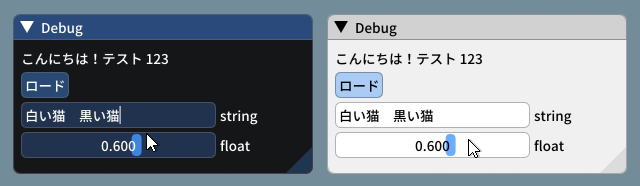 | |
| <br>_(settings: Dark style (left), Light style (right) / Font: NotoSansCJKjp-Medium, 20px / Rounding: 5)_ | |
| ##### [Return to Index](#index) | |
| --------------------------------------- | |
| ## Loading Font Data from Memory | |
| ```cpp | |
| ImFont* font = io.Fonts->AddFontFromMemoryTTF(data, data_size, size_pixels, ...); | |
| ``` | |
| IMPORTANT: `AddFontFromMemoryTTF()` by default transfer ownership of the data buffer to the font atlas, which will attempt to free it on destruction. | |
| This was to avoid an unnecessary copy, and is perhaps not a good API (a future version will redesign it). | |
| If you want to keep ownership of the data and free it yourself, you need to clear the `FontDataOwnedByAtlas` field: | |
| ```cpp | |
| ImFontConfig font_cfg; | |
| font_cfg.FontDataOwnedByAtlas = false; | |
| ImFont* font = io.Fonts->AddFontFromMemoryTTF(data, data_size, size_pixels, &font_cfg); | |
| ``` | |
| IMPORTANT: Since 1.92, when using `FontDataOwnedByAtlas = false`, font data needs to available until `atlas->RemoveFont()`, or more typically until a shutdown of the owning context or font atlas. It was not immediately noticeable in 1.92.0 due to a bug in handling `FontDataOwnedByAtlas = false`, which was fixed in 1.92.6. | |
| ##### [Return to Index](#index) | |
| --------------------------------------- | |
| ## Loading Font Data Embedded In Source Code | |
| - Compile and use [binary_to_compressed_c.cpp](https://github.com/ocornut/imgui/blob/master/misc/fonts/binary_to_compressed_c.cpp) to create a compressed C style array that you can embed in source code. | |
| - See the documentation in [binary_to_compressed_c.cpp](https://github.com/ocornut/imgui/blob/master/misc/fonts/binary_to_compressed_c.cpp) for instructions on how to use the tool. | |
| - You may find a precompiled version binary_to_compressed_c.exe for Windows inside the demo binaries package (see [README](https://github.com/ocornut/imgui/blob/master/docs/README.md)). | |
| - The tool can optionally output Base85 encoding to reduce the size of _source code_ but the read-only arrays in the actual binary will be about 20% bigger. | |
| Then load the font with: | |
| ```cpp | |
| ImFont* font = io.Fonts->AddFontFromMemoryCompressedTTF(compressed_data, compressed_data_size, size_pixels, ...); | |
| ``` | |
| or | |
| ```cpp | |
| ImFont* font = io.Fonts->AddFontFromMemoryCompressedBase85TTF(compressed_data_base85, size_pixels, ...); | |
| ``` | |
| ##### [Return to Index](#index) | |
| --------------------------------------- | |
| ## Using Icon Fonts | |
| Using an icon font (such as [FontAwesome](http://fontawesome.io) or [OpenFontIcons](https://github.com/traverseda/OpenFontIcons)) is an easy and practical way to use icons in your Dear ImGui application. | |
| A common pattern is to merge the icon font within your main font, so you can embed icons directly from your strings without having to change fonts back and forth. | |
| To refer to the icon UTF-8 codepoints from your C++ code, you may use those headers files created by Juliette Foucaut: https://github.com/juliettef/IconFontCppHeaders. | |
| So you can use `ICON_FA_SEARCH` as a string that will render as a "Search" icon. | |
| 🆕 **Since 1.92, with an up to date backend: specifying glyph ranges is unnecessary. You can omit this parameter.** | |
| Example Setup: | |
| ```cpp | |
| // Merge icons into default tool font | |
| #include "IconsFontAwesome.h" | |
| ImGuiIO& io = ImGui::GetIO(); | |
| io.Fonts->AddFontDefaultVector(); | |
| ImFontConfig config; | |
| config.MergeMode = true; | |
| config.GlyphMinAdvanceX = 13.0f; // Use if you want to make the icon monospaced | |
| io.Fonts->AddFontFromFileTTF("fonts/fontawesome-webfont.ttf", 13.0f, &config); | |
| ``` | |
| :rewind: **Before 1.92:** | |
| ```cpp | |
| // Merge icons into default tool font | |
| #include "IconsFontAwesome.h" | |
| ImGuiIO& io = ImGui::GetIO(); | |
| io.Fonts->AddFontDefault(); | |
| ImFontConfig config; | |
| config.MergeMode = true; | |
| config.GlyphMinAdvanceX = 13.0f; // Use if you want to make the icon monospaced | |
| static const ImWchar icon_ranges[] = { ICON_MIN_FA, ICON_MAX_FA, 0 }; | |
| io.Fonts->AddFontFromFileTTF("fonts/fontawesome-webfont.ttf", 13.0f, &config, icon_ranges); | |
| ``` | |
| Example Usage: | |
| ```cpp | |
| // Usage, e.g. | |
| ImGui::Text("%s among %d items", ICON_FA_SEARCH, count); | |
| ImGui::Button(ICON_FA_SEARCH " Search"); | |
| // C string _literals_ can be concatenated at compilation time, e.g. "hello" " world" | |
| // ICON_FA_SEARCH is defined as a string literal so this is the same as "A" "B" becoming "AB" | |
| ``` | |
| See Links below for other icons fonts and related tools. | |
| **Monospace Icons?** | |
| To make your icon look more monospace and facilitate alignment, you may want to set the `ImFontConfig::GlyphMinAdvanceX` value when loading an icon font. | |
| If you `GlyphMinAdvanceX` you need to pass a `font_size` to `AddFontXXX()` calls, as the MinAdvanceX value will be specified for the given size and scaled otherwise. | |
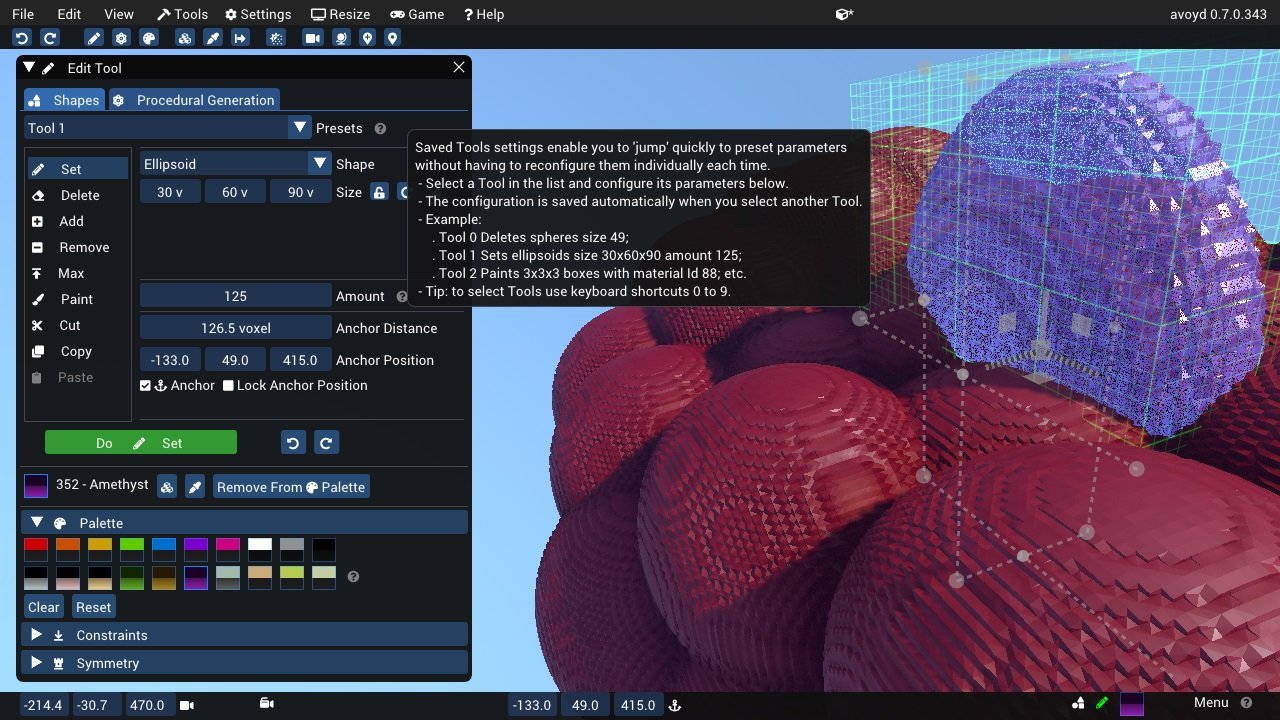
| **Screenshot** | |
| Here's an application using icons ("Avoyd", https://www.avoyd.com): | |
|  | |
| ##### [Return to Index](#index) | |
| --------------------------------------- | |
| ### Excluding Overlapping Ranges | |
| 🆕 **Since 1.92, with an up to date backend: glyphs ranges are ignored**: when loading a glyph, input fonts in the merge list are queried in order. The first font which has the glyph loads it. | |
| <BR>‼️ **If you are merging several fonts, you may have undesirable overlapping ranges.** You can use `ImFontConfig::GlyphExcludeRanges[] `to specify ranges to ignore in a given Input. | |
| ```cpp | |
| // Add Font Source 1 but ignore ICON_MIN_FA..ICON_MAX_FA range | |
| static ImWchar exclude_ranges[] = { ICON_MIN_FA, ICON_MAX_FA, 0 }; | |
| ImFontConfig cfg1; | |
| cfg1.GlyphExcludeRanges = exclude_ranges; | |
| io.Fonts->AddFontFromFileTTF("segoeui.ttf", 0.0f, &cfg1); | |
| // Add Font Source 2, which expects to use the range above | |
| ImFontConfig cfg2; | |
| cfg2.MergeMode = true; | |
| io.Fonts->AddFontFromFileTTF("FontAwesome4.ttf", 0.0f, &cfg2); | |
| ``` | |
| Another (silly) example: | |
| ```cpp | |
| // Remove 'A'-'Z' from first font | |
| static ImWchar exclude_ranges[] = { 'A', 'Z', 0 }; | |
| ImFontConfig cfg1; | |
| cfg1.GlyphExcludeRanges = exclude_ranges; | |
| io.Fonts->AddFontFromFileTTF("segoeui.ttf", 0.0f, &cfg1); | |
| // Load another font to fill the gaps | |
| ImFontConfig cfg2; | |
| cfg2.MergeMode = true; | |
| io.Fonts->AddFontFromFileTTF("Roboto-Medium.ttf", 0.0f, &cfg2); | |
| ``` | |
|  | |
| You can use `Metrics/Debugger->Fonts->Font->Input Glyphs Overlap Detection Tool` to see list of glyphs available in multiple font sources. This can facilitate understanding which font input is providing which glyph. | |
| ##### [Return to Index](#index) | |
| --------------------------------------- | |
| ## Using FreeType Rasterizer (imgui_freetype) | |
| - Dear ImGui uses [stb_truetype.h](https://github.com/nothings/stb/) to rasterize fonts (with optional oversampling). This technique and its implementation are not ideal for fonts rendered at small sizes, which may appear a little blurry or hard to read. | |
| - You can however use `imgui_freetype.cpp` from the [misc/freetype/](https://github.com/ocornut/imgui/tree/master/misc/freetype) folder. Compile with this file and add `#define IMGUI_ENABLE_FREETYPE` to your imconfig.h file or build system to automatically activate it. | |
| - FreeType supports auto-hinting which tends to improve the readability of small fonts. It makes a big difference especially at smaller resolutions. | |
| - Read documentation in the [misc/freetype/](https://github.com/ocornut/imgui/tree/master/misc/freetype) folder. | |
| - Correct sRGB space blending will have an important effect on your font rendering quality. | |
| ##### [Return to Index](#index) | |
| --------------------------------------- | |
| ## Using Colorful Glyphs/Emojis | |
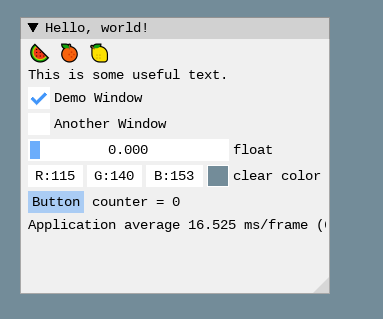
| - Rendering of colored emojis is supported by imgui_freetype with FreeType 2.10+. | |
| - You will need to load fonts with the `ImGuiFreeTypeBuilderFlags_LoadColor` flag. | |
| - Emojis are frequently encoded in upper Unicode layers (character codes >0x10000) and will need dear imgui compiled with `IMGUI_USE_WCHAR32`. | |
| - Not all types of color fonts are supported by FreeType at the moment. | |
| - Stateful Unicode features such as skin tone modifiers are not supported by the text renderer. | |
|  | |
| ```cpp | |
| io.Fonts->AddFontFromFileTTF("../../../imgui_dev/data/fonts/NotoSans-Regular.ttf", 16.0f); | |
| static ImWchar ranges[] = { 0x1, 0x1FFFF, 0 }; | |
| static ImFontConfig cfg; | |
| cfg.MergeMode = true; | |
| cfg.FontLoaderFlags |= ImGuiFreeTypeLoaderFlags_LoadColor; | |
| io.Fonts->AddFontFromFileTTF("C:\\Windows\\Fonts\\seguiemj.ttf", 16.0f, &cfg); | |
| ``` | |
| ##### [Return to Index](#index) | |
| --------------------------------------- | |
| ## Using Custom Glyph Ranges | |
| 🆕 **Since 1.92, with an up to date backend: specifying glyph ranges is unnecessary. Therefore this is not really useful any more.** | |
| :rewind: You can use the `ImFontGlyphRangesBuilder` helper to create glyph ranges based on text input. For example: for a game where your script is known, if you can feed your entire script to it and only build the characters the game needs. | |
| ```cpp | |
| ImVector<ImWchar> ranges; | |
| ImFontGlyphRangesBuilder builder; | |
| builder.AddText("Hello world"); // Add a string (here "Hello world" contains 7 unique characters) | |
| builder.AddChar(0x7262); // Add a specific character | |
| builder.AddRanges(io.Fonts->GetGlyphRangesJapanese()); // Add one of the default ranges | |
| builder.BuildRanges(&ranges); // Build the final result (ordered ranges with all the unique characters submitted) | |
| io.Fonts->AddFontFromFileTTF("myfontfile.ttf", size_in_pixels, nullptr, ranges.Data); | |
| io.Fonts->Build(); // Build the atlas while 'ranges' is still in scope and not deleted. | |
| ``` | |
| ##### [Return to Index](#index) | |
| --------------------------------------- | |
| ## Using Custom Colorful Icons | |
| 🆕 **Since 1.92, with an up to date backend: this system has been revamped.** | |
| TL;DR; With the new system, it is recommended that you create a custom `ImFontLoader` and register your fonts with it. | |
| `AddCustomRectFontGlyph()` has been obsoleted because its API does not make much sense with resizable fonts. | |
| You can ask questions in [#8466](https://github.com/ocornut/imgui/issues/8466). | |
| :rewind: **Before 1.92:** | |
| As an alternative to rendering colorful glyphs using imgui_freetype with `ImGuiFreeTypeBuilderFlags_LoadColor`, you may allocate your own space in the texture atlas and write yourself into it. **(This is a BETA api, use if you are familiar with dear imgui and with your rendering backend)** | |
| - You can use the `ImFontAtlas::AddCustomRect()` and `ImFontAtlas::AddCustomRectFontGlyph()` api to register rectangles that will be packed into the font atlas texture. Register them before building the atlas, then call Build()`. | |
| - You can then use `ImFontAtlas::GetCustomRect(int)` to query the position/size of your rectangle within the texture, and blit/copy any graphics data of your choice into those rectangles. | |
| - This API is beta because it is likely to change in order to support multi-dpi (multiple viewports on multiple monitors with varying DPI scale). | |
| #### Pseudo-code: | |
| ```cpp | |
| // Add font, then register two custom 13x13 rectangles mapped to glyph 'a' and 'b' of this font | |
| ImFont* font = io.Fonts->AddFontDefaultVector(); | |
| int rect_ids[2]; | |
| rect_ids[0] = io.Fonts->AddCustomRectFontGlyph(font, 'a', 13, 13, 13+1); | |
| rect_ids[1] = io.Fonts->AddCustomRectFontGlyph(font, 'b', 13, 13, 13+1); | |
| // Build atlas | |
| io.Fonts->Build(); | |
| // Retrieve texture in RGBA format | |
| unsigned char* tex_pixels = nullptr; | |
| int tex_width, tex_height; | |
| io.Fonts->GetTexDataAsRGBA32(&tex_pixels, &tex_width, &tex_height); | |
| for (int rect_n = 0; rect_n < IM_COUNTOF(rect_ids); rect_n++) | |
| if (const ImTextureRect* rect = io.Fonts->GetCustomRect(rect_ids[rect_n])) | |
| { | |
| // Fill the custom rectangle with red pixels (in reality you would draw/copy your bitmap data here!) | |
| for (int y = 0; y < rect->Height; y++) | |
| { | |
| ImU32* p = (ImU32*)tex_pixels + (rect->Y + y) * tex_width + (rect->X); | |
| for (int x = rect->Width; x > 0; x--) | |
| *p++ = IM_COL32(255, 0, 0, 255); | |
| } | |
| } | |
| ``` | |
| ##### [Return to Index](#index) | |
| --------------------------------------- | |
| ## About Filenames | |
| **Please note that many new C/C++ users have issues loading their files _because the filename they provide is wrong_ due to incorrect assumption of what is the current directory.** | |
| Two things to watch for: | |
| (1) In C/C++ and most programming languages if you want to use a backslash `\` within a string literal, you need to write it double backslash `\\`. At it happens, Windows uses backslashes as a path separator, so be mindful. | |
| ```cpp | |
| io.Fonts->AddFontFromFileTTF("MyFiles\MyImage01.jpg", ...); // This is INCORRECT!! | |
| io.Fonts->AddFontFromFileTTF("MyFiles\\MyImage01.jpg", ...); // This is CORRECT | |
| ``` | |
| In some situations, you may also use `/` path separator under Windows. | |
| (2) Make sure your IDE/debugger settings starts your executable from the right working (current) directory. In Visual Studio you can change your working directory in project `Properties > General > Debugging > Working Directory`. People assume that their execution will start from the root folder of the project, where by default it often starts from the folder where object or executable files are stored. | |
| ```cpp | |
| io.Fonts->AddFontFromFileTTF("MyImage01.jpg", ...); // Relative filename depends on your Working Directory when running your program! | |
| io.Fonts->AddFontFromFileTTF("../MyImage01.jpg", ...); // Load from the parent folder of your Working Directory | |
| ``` | |
| ##### [Return to Index](#index) | |
| --------------------------------------- | |
| ## About UTF-8 Encoding | |
| **For non-ASCII characters display, a common user issue is not passing correctly UTF-8 encoded strings.** | |
| (1) We provide a function `ImGui::DebugTextEncoding(const char* text)` which you can call to verify the content of your UTF-8 strings. | |
| This is a convenient way to confirm that your encoding is correct. | |
| ```cpp | |
| ImGui::SeparatorText("CORRECT"); | |
| ImGui::DebugTextEncoding(u8"こんにちは"); | |
| ImGui::SeparatorText("INCORRECT"); | |
| ImGui::DebugTextEncoding("こんにちは"); | |
| ``` | |
|  | |
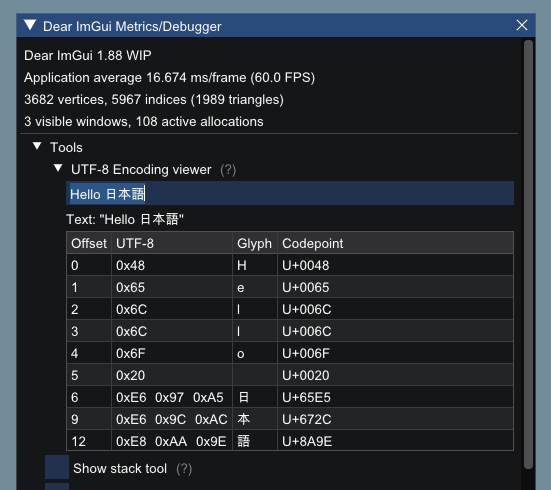
| You can also find this tool under `Metrics/Debuggers->Tools->UTF-8 Encoding viewer` if you want to paste from clipboard, but this won't validate the UTF-8 encoding done by your compiler. | |
| (2) To encode in UTF-8: | |
| There are also compiler-specific ways to enforce UTF-8 encoding by default: | |
| - Visual Studio compiler: `/utf-8` command-line flag. | |
| - Visual Studio compiler: `#pragma execution_character_set("utf-8")` inside your code. | |
| - Since May 2023 we have changed the Visual Studio projects of all our examples to use `/utf-8` ([see commit](https://github.com/ocornut/imgui/commit/513af1efc9080857bbd10000d98f98f2a0c96803)). | |
| Or, since C++11, you can use the `u8"my text"` syntax to encode literal strings as UTF-8. e.g.: | |
| ```cpp | |
| ImGui::Text(u8"hello"); | |
| ImGui::Text(u8"こんにちは"); // this will always be encoded as UTF-8 | |
| ImGui::Text("こんにちは"); // the encoding of this is depending on compiler settings/flags and may be incorrect. | |
| ``` | |
| Since C++20, because the C++ committee hate its users, they decided to change the `u8""` syntax to not return `const char*` but a new type `const char8_t*` which doesn't cast to `const char*`. | |
| Because of type usage of `u8""` in C++20 is a little more tedious: | |
| ```cpp | |
| ImGui::Text((const char*)u8"こんにちは"); | |
| ``` | |
| However, you can disable this behavior completely using the compiler option [`/Zc:char8_t-`](https://learn.microsoft.com/en-us/cpp/build/reference/zc-char8-t?view=msvc-170) for MSVC and [`-fno-char8_t`](https://www.open-std.org/jtc1/sc22/wg21/docs/papers/2019/p1423r3.html) for Clang and GCC. | |
| ##### [Return to Index](#index) | |
| --------------------------------------- | |
| ## Debug Tools | |
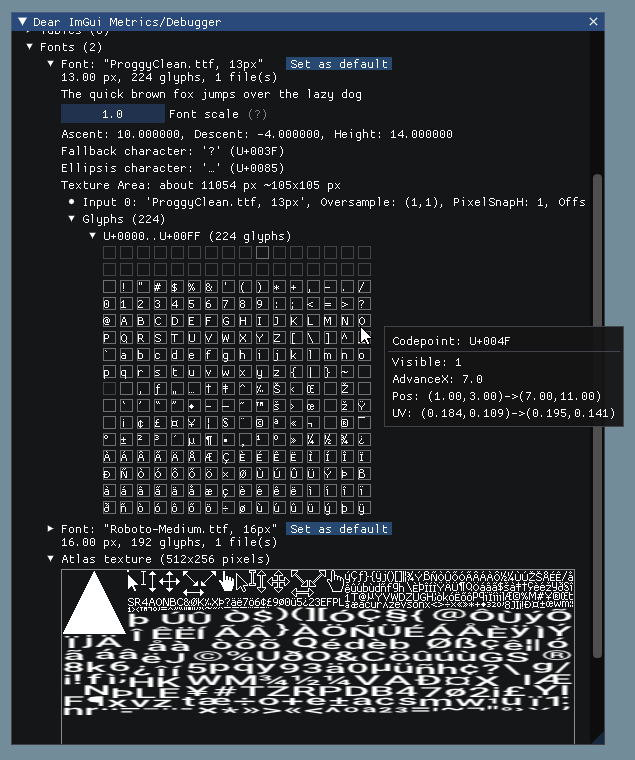
| #### Metrics/Debugger->Fonts | |
| You can use the `Metrics/Debugger` window (available in `Demo>Tools`) to browse your fonts and understand what's going on if you have an issue. You can also reach it in `Demo->Tools->Style Editor->Fonts`. The same information are also available in the Style Editor under Fonts. | |
|  | |
| #### UTF-8 Encoding Viewer** | |
| You can use the `UTF-8 Encoding viewer` in `Metrics/Debugger` to verify the content of your UTF-8 strings. From C/C++ code, you can call `ImGui::DebugTextEncoding("my string");` function to verify that your UTF-8 encoding is correct. | |
|  | |
| ##### [Return to Index](#index) | |
| --------------------------------------- | |
| ## Credits/Licenses For Fonts Included In Repository | |
| Embedded in source code: | |
| **ProggyClean.ttf**, by Tristan Grimmer | |
| <br>MIT License | |
| <br>(recommended loading setting: Size = 13.0, GlyphOffset.y = +1, PixelSnapH = true) | |
| <br>https://github.com/bluescan/proggyfonts | |
| **ProggyForever.ttf**, by Disco Hello, Tristan Grimmer | |
| <BR>MIT License | |
| <BR>https://github.com/ocornut/proggyforever | |
| Extra fonts files are available in the `misc/fonts/` folder. | |
| Compared to 2014 when they were first introduced, we now have better font support and we embed ProggyForever. | |
| I believe all the files here are unnecessary nowadays. You can find font yourself. They might eventually be removed. | |
| **Roboto-Medium.ttf**, by Christian Robetson | |
| <br>Apache License 2.0 | |
| <br>https://fonts.google.com/specimen/Roboto | |
| **Cousine-Regular.ttf**, by Steve Matteson | |
| <br>Digitized data copyright (c) 2010 Google Corporation. | |
| <br>Licensed under the SIL Open Font License, Version 1.1 | |
| <br>https://fonts.google.com/specimen/Cousine | |
| **DroidSans.ttf**, by Steve Matteson | |
| <br>Apache License 2.0 | |
| <br>https://www.fontsquirrel.com/fonts/droid-sans | |
| **ProggyTiny.ttf**, by Tristan Grimmer | |
| <br>MIT License | |
| <br>(recommended loading setting: Size = 10.0, GlyphOffset.y = +1) | |
| <br>https://github.com/bluescan/proggyfonts | |
| **Karla-Regular.ttf**, by Jonathan Pinhorn | |
| <br>SIL OPEN FONT LICENSE Version 1.1 | |
| ##### [Return to Index](#index) | |
| ## Font Links | |
| #### ICON FONTS | |
| - C/C++ header for icon fonts (#define with code points to use in source code string literals) https://github.com/juliettef/IconFontCppHeaders | |
| - FontAwesome https://fortawesome.github.io/Font-Awesome | |
| - OpenFontIcons https://github.com/traverseda/OpenFontIcons | |
| - Google Icon Fonts https://design.google.com/icons/ | |
| - Kenney Icon Font (Game Controller Icons) https://github.com/nicodinh/kenney-icon-font | |
| - IcoMoon - Custom Icon font builder https://icomoon.io/app | |
| #### REGULAR FONTS | |
| - Google Noto Fonts (worldwide languages) https://www.google.com/get/noto/ | |
| - Open Sans Fonts https://fonts.google.com/specimen/Open+Sans | |
| - (Japanese) M+ fonts by Coji Morishita http://mplus-fonts.sourceforge.jp/mplus-outline-fonts/index-en.html | |
| #### MONOSPACE FONTS | |
| <img width="1172" height="715" alt="image" src="https://github.com/user-attachments/assets/c9702534-4877-41c9-ae0d-252933c26ced" /> | |
| - Proggy Fonts, by Tristan Grimmer https://github.com/bluescan/proggyfonts | |
| - Sweet16, Sweet16 Mono, by Martin Sedlak (Latin + Supplemental + Extended A) https://github.com/kmar/Sweet16Font | |
| - Google Noto Mono Fonts: https://www.google.com/get/noto/ | |
| - Typefaces for source code beautification: https://github.com/chrissimpkins/codeface | |
| - Programmation fonts: http://s9w.github.io/font_compare/ | |
| - Inconsolata: http://www.levien.com/type/myfonts/inconsolata.html | |
| - Adobe Source Code Pro: Monospaced font family for ui & coding environments https://github.com/adobe-fonts/source-code-pro | |
| - Monospace/Fixed Width Programmer's Fonts http://www.lowing.org/fonts/ | |
| Or use Arial Unicode or other Unicode fonts provided with Windows for full characters coverage (not sure of their licensing). | |
| ##### [Return to Index](#index) |